
Gantt Chart Template With Task Duration Calculator
Gantt Chart Template with Task Duration Calculator: A Comprehensive Guide
Project management relies heavily on visual tools to plan, schedule, and track progress. The Gantt chart, a horizontal bar chart, is a cornerstone of project planning, providing a clear visual representation of project timelines, tasks, and dependencies. To further streamline project workflows, integrating a task duration calculator into a Gantt chart template offers enhanced efficiency and accuracy in estimating task completion times.
Understanding the Gantt Chart
A Gantt chart visually represents a project schedule. Its primary components include:
- Tasks: Project activities or work packages broken down into manageable units.
- Start and End Dates: The scheduled beginning and conclusion dates for each task.
- Duration: The time allocated to complete each task. Represented visually by the length of the task bar.
- Dependencies: Relationships between tasks, indicating which tasks must be completed before others can begin (e.g., finish-to-start, start-to-start).
- Milestones: Significant checkpoints in the project timeline, representing key achievements or deliverables.
- Resources: Individuals or teams assigned to each task.
Gantt charts facilitate several crucial project management activities:
- Planning: Define tasks, estimate durations, and establish dependencies.
- Scheduling: Allocate resources, set start and end dates, and create a project timeline.
- Tracking: Monitor progress, identify delays, and adjust the schedule as needed.
- Communication: Effectively communicate project timelines and responsibilities to stakeholders.
The Importance of Accurate Task Duration Estimation
Accurate task duration estimation is paramount to successful project management. Overestimating or underestimating task durations can lead to several negative consequences:
- Missed Deadlines: Underestimated durations can cause delays, impacting subsequent tasks and potentially jeopardizing the entire project timeline.
- Resource Misallocation: Inaccurate estimates can result in understaffing or overstaffing tasks, leading to inefficiency and increased costs.
- Cost Overruns: Delays and resource misallocation can contribute to increased project expenses.
- Stakeholder Dissatisfaction: Missed deadlines and cost overruns can erode stakeholder confidence and trust.
Integrating a Task Duration Calculator
A task duration calculator embedded within a Gantt chart template automates and enhances the estimation process. This calculator utilizes various techniques to arrive at more accurate and realistic duration estimates. Key elements and techniques often included are:
- Historical Data Analysis: Accessing and analyzing data from similar past projects to identify patterns and trends in task durations. This data-driven approach leverages past experiences to inform current estimates.
- Expert Judgment: Gathering input from subject matter experts (SMEs) who possess in-depth knowledge of the tasks involved. Their expertise can provide valuable insights into potential challenges and complexities that may affect task duration.
- Three-Point Estimating: Employing a weighted average of three estimates: optimistic (best-case scenario), pessimistic (worst-case scenario), and most likely (realistic scenario). The commonly used PERT formula (Program Evaluation and Review Technique) calculates the expected duration as (Optimistic + 4 * Most Likely + Pessimistic) / 6.
- Consideration of Constraints: Accounting for external factors and constraints that may impact task durations, such as resource availability, dependencies on external vendors, or regulatory requirements.
- Monte Carlo Simulation: Utilizing a simulation technique that generates numerous random scenarios based on probability distributions for task durations. This approach provides a range of possible outcomes and helps assess the likelihood of meeting deadlines.
- Resource Allocation Integration: The calculator should dynamically adjust duration estimates based on the number of resources assigned to a task. Increasing resources might shorten the duration, while decreasing resources may lengthen it.
- Built-in Risk Assessment: Some advanced calculators incorporate a risk assessment component, allowing users to identify potential risks that could impact task durations and adjust estimates accordingly.
Benefits of Using a Gantt Chart Template with Task Duration Calculator
Integrating a task duration calculator into a Gantt chart template offers significant advantages:
- Improved Accuracy: Reduces the risk of inaccurate estimates, leading to more realistic project schedules.
- Enhanced Efficiency: Automates the estimation process, saving time and effort.
- Data-Driven Decision Making: Provides a data-driven basis for estimating task durations, reducing reliance on guesswork.
- Better Resource Allocation: Facilitates more efficient resource allocation by providing a clearer understanding of task durations.
- Reduced Risk: Identifies potential risks and constraints that could impact task durations, allowing for proactive mitigation strategies.
- Improved Communication: Provides a clear and transparent view of project timelines and task durations, improving communication among stakeholders.
- Proactive Schedule Management: Allows project managers to quickly assess the impact of changes to task durations on the overall project timeline.
Choosing the Right Template
When selecting a Gantt chart template with a task duration calculator, consider the following factors:
- Ease of Use: The template should be intuitive and user-friendly, allowing for easy input of task information and generation of accurate duration estimates.
- Customizability: The template should be customizable to meet the specific needs of your project.
- Integration Capabilities: The template should integrate seamlessly with other project management tools, such as resource management software or communication platforms.
- Collaboration Features: If multiple team members will be using the template, it should offer collaboration features, such as shared access and real-time updates.
- Reporting Capabilities: The template should generate comprehensive reports that provide insights into project progress and potential risks.
- Cost: Consider the cost of the template and whether it aligns with your budget. Free or open-source templates may be suitable for smaller projects, while paid templates may offer more advanced features for larger, more complex projects.
Conclusion
A Gantt chart template with an integrated task duration calculator is a powerful tool for enhancing project planning, scheduling, and tracking. By automating the estimation process, leveraging historical data, and considering various constraints, this combination provides project managers with the insights needed to create more accurate and realistic project timelines, ultimately increasing the likelihood of project success.
 440×570 monthly task gantt chart template word excel apple from www.template.net
  900×860 gantt chart templates excel from www.template.net
  0 x 0 gantt chart excel template teamgantt from www.teamgantt.com
 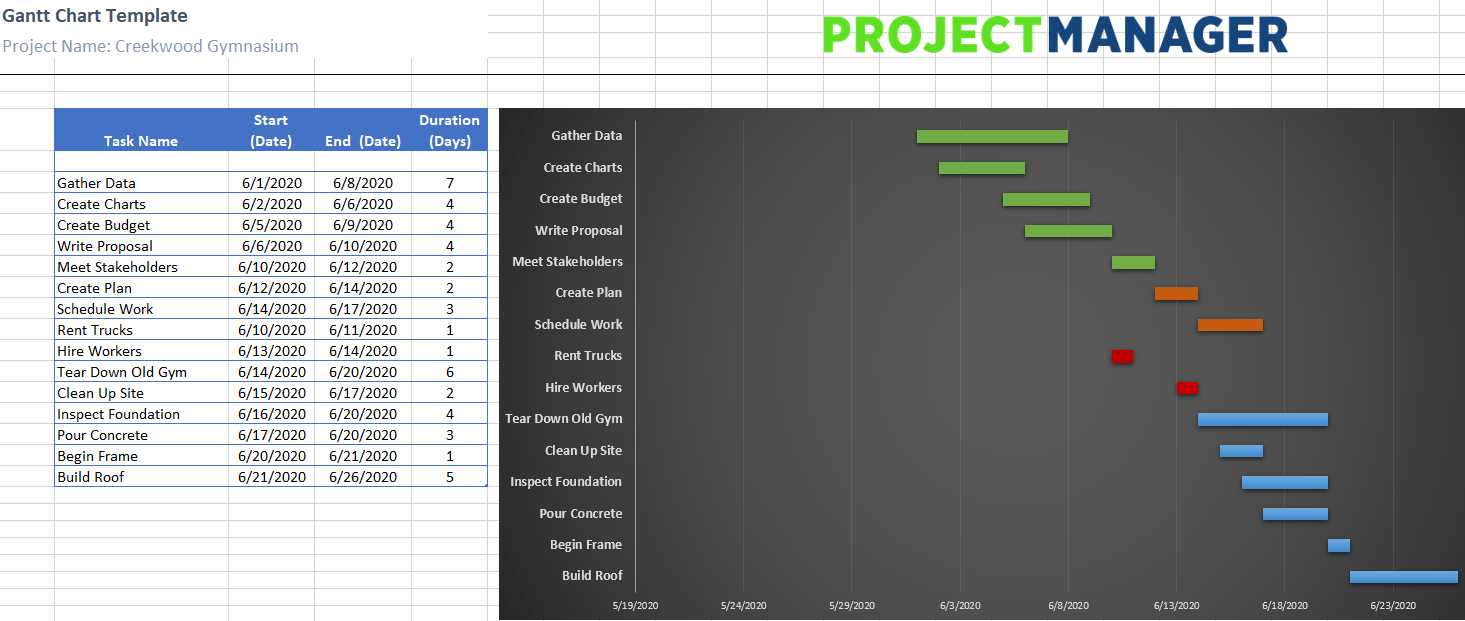 1465×621 gantt chart excel template projectmanagercom from www.projectmanager.com
  1920×1080 gantt chart template production from www.studiobinder.com
 Thank you for visiting Gantt Chart Template With Task Duration Calculator. There are a lot of beautiful templates out there, but it can be easy to feel like a lot of the best cost a ridiculous amount of money, require special design. And if at this time you are looking for information and ideas regarding the Gantt Chart Template With Task Duration Calculator then, you are in the perfect place. Get this Gantt Chart Template With Task Duration Calculator for free here. We hope this post Gantt Chart Template With Task Duration Calculator inspired you and help you what you are looking for.
Gantt Chart Template With Task Duration Calculator was posted in January 11, 2026 at 4:03 am. If you wanna have it as yours, please click the Pictures and you will go to click right mouse then Save Image As and Click Save and download the Gantt Chart Template With Task Duration Calculator Picture.. Don’t forget to share this picture with others via Facebook, Twitter, Pinterest or other social medias! we do hope you'll get inspired by SampleTemplates123... Thanks again! If you have any DMCA issues on this post, please contact us!