
Gantt Chart Template For Bootstrapped Projects
Gantt charts are indispensable tools for project management, offering a visual representation of project timelines, tasks, dependencies, and milestones. For bootstrapped projects, where resources are often limited and efficiency is paramount, a well-designed Gantt chart template can be a game-changer. This guide will explore the benefits of using Gantt charts for bootstrapped projects and provide insights into creating and utilizing effective templates. A Gantt chart template provides a pre-structured framework for visualizing project timelines. It typically includes columns for task names, start and end dates, durations, dependencies, assignees, and progress indicators. The visual representation uses horizontal bars to represent each task, extending across the timeline according to its duration. Dependencies between tasks are indicated with arrows, and milestones are often highlighted to mark significant achievements. **Why Gantt Charts are Crucial for Bootstrapped Projects:** * **Clarity and Visualization:** Bootstrapped projects often involve multiple team members, each juggling various responsibilities. A Gantt chart provides a clear, visual representation of the entire project scope, ensuring everyone understands their roles and deadlines. This shared understanding minimizes confusion and promotes effective collaboration. * **Prioritization and Task Management:** Bootstrapped projects often require ruthlessly prioritizing tasks due to limited resources. A Gantt chart helps identify critical tasks and dependencies, allowing teams to focus on the most important activities that drive project progress. This prioritization ensures that resources are allocated efficiently and bottlenecks are addressed promptly. * **Resource Allocation:** When budgets are tight, efficient resource allocation is critical. A Gantt chart allows you to visualize resource assignments for each task, ensuring that resources are not over-allocated or under-utilized. This optimizes resource allocation, preventing delays and cost overruns. * **Progress Tracking and Monitoring:** Tracking progress is essential for keeping bootstrapped projects on track. Gantt charts provide a real-time view of task completion, allowing project managers to identify potential delays or roadblocks early on. This enables proactive intervention and adjustments to the project plan. * **Risk Management:** By visually mapping out dependencies and critical paths, Gantt charts help identify potential risks and challenges early on. This allows project managers to develop contingency plans and mitigate risks before they impact the project timeline. * **Improved Communication:** Gantt charts serve as a central communication tool for all project stakeholders. They facilitate clear communication of project timelines, progress updates, and any potential issues. This ensures that everyone is informed and aligned, fostering a collaborative and transparent project environment. **Creating an Effective Gantt Chart Template for Bootstrapped Projects:** When creating a Gantt chart template for bootstrapped projects, consider the following: 1. **Choose the Right Tool:** Several tools are available for creating Gantt charts, ranging from simple spreadsheet software to specialized project management platforms. Select a tool that aligns with your project’s complexity and your team’s technical capabilities. * *Spreadsheet Software (e.g., Google Sheets, Microsoft Excel):* Suitable for simple projects with few tasks and dependencies. * *Online Gantt Chart Tools (e.g., TeamGantt, Asana, Trello with Power-Ups):* Offer more advanced features like dependency management, resource allocation, and collaboration tools. * *Project Management Software (e.g., Jira, Monday.com):* Best for complex projects with large teams and intricate workflows. 2. **Define Project Scope and Tasks:** Clearly define the project’s objectives and break it down into smaller, manageable tasks. This ensures that the Gantt chart accurately reflects the project’s scope and deliverables. 3. **Identify Dependencies:** Determine the relationships between tasks. Which tasks must be completed before others can begin? Identify critical dependencies to avoid delays and ensure tasks are completed in the correct sequence. 4. **Estimate Task Durations:** Accurately estimate the time required to complete each task. Consider factors like resource availability, task complexity, and potential roadblocks. Use realistic estimates to create a reliable project timeline. 5. **Assign Resources:** Assign team members to each task based on their skills and availability. Ensure that resources are not over-allocated and that each team member has a clear understanding of their responsibilities. 6. **Set Milestones:** Define key milestones to mark significant progress points throughout the project. Milestones provide a sense of accomplishment and help keep the project on track. 7. **Define Critical Path:** Identify the critical path, which is the sequence of tasks that directly affects the project’s completion date. Pay close attention to tasks on the critical path to avoid delays. 8. **Create Visual Representation:** Use horizontal bars to represent each task’s duration on the timeline. Use different colors to differentiate tasks or highlight critical tasks. Show dependencies with arrows connecting related tasks. 9. **Add Progress Indicators:** Include a column or visual cue to indicate the progress of each task (e.g., percentage completion, status labels). This allows for easy tracking of project progress and identification of potential issues. 10. **Regularly Update and Maintain:** Gantt charts are not static documents. Regularly update the chart to reflect actual progress, changes in task durations, or any new dependencies. Maintain the chart to ensure it remains a relevant and accurate representation of the project timeline. **Elements of a Sample Gantt Chart Template:** Here’s a breakdown of essential elements you would find in a Gantt chart template: | Column Header | Description | | —————— | ——————————————————————————————————— | | Task Name | Name of the individual task or activity. | | Start Date | The date the task is scheduled to begin. | | End Date | The date the task is scheduled to be completed. | | Duration (Days) | Number of days required to complete the task. | | Predecessors | Indicates the task(s) that must be completed before this task can begin (dependency). | | Assigned To | The team member responsible for completing the task. | | Status | Current status of the task (e.g., Not Started, In Progress, Completed, Blocked). | | % Complete | Percentage of the task that has been completed. | | Notes/Comments | Any relevant information or notes regarding the task. | Gantt chart templates are invaluable tools for bootstrapped projects. By leveraging these charts effectively, bootstrapped teams can enhance project clarity, optimize resource allocation, and improve overall project success rates, even with limited resources. They offer a clear pathway to accomplishing objectives, fostering transparency and enabling efficient management, leading to successful project outcomes.
 814×460 gantt chart template collection from www.officetimeline.com
  700×865 gantt chart template sampleexample format from www.template.net
  1560×720 gantt chart budget template spreadshee gantt chart budget from db-excel.com
  1210×266 contact business casual start bootstrap theme from www.ceias.nau.edu
  1000×1000 business preparation gantt chart from www.smartdraw.com
 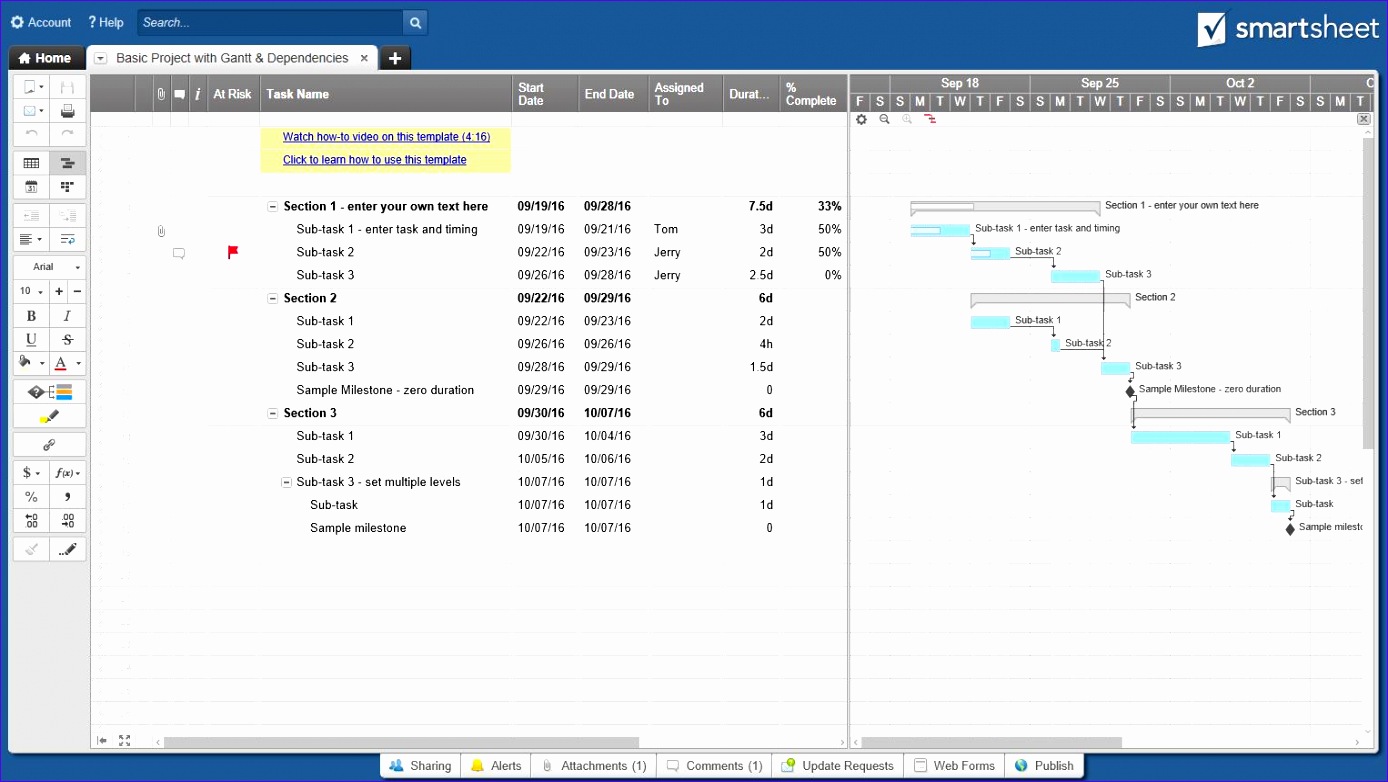 1388×782 gantt chart template excel excel templates from www.exceltemplate123.us
 Thank you for visiting Gantt Chart Template For Bootstrapped Projects. There are a lot of beautiful templates out there, but it can be easy to feel like a lot of the best cost a ridiculous amount of money, require special design. And if at this time you are looking for information and ideas regarding the Gantt Chart Template For Bootstrapped Projects then, you are in the perfect place. Get this Gantt Chart Template For Bootstrapped Projects for free here. We hope this post Gantt Chart Template For Bootstrapped Projects inspired you and help you what you are looking for.
Gantt Chart Template For Bootstrapped Projects was posted in December 30, 2025 at 4:42 pm. If you wanna have it as yours, please click the Pictures and you will go to click right mouse then Save Image As and Click Save and download the Gantt Chart Template For Bootstrapped Projects Picture.. Don’t forget to share this picture with others via Facebook, Twitter, Pinterest or other social medias! we do hope you'll get inspired by SampleTemplates123... Thanks again! If you have any DMCA issues on this post, please contact us!