
Text-based Gantt Chart Format Template
Text-Based Gantt Chart Templates: A Simple Guide
Gantt charts are indispensable tools for project management, offering a visual timeline of tasks, dependencies, and milestones. While sophisticated software solutions abound, the humble text-based Gantt chart retains its relevance due to its simplicity, portability, and accessibility. This format requires no specialized software, relying instead on plain text editors and a bit of creative formatting. This article explores various template styles and considerations for creating effective text-based Gantt charts.
Why Choose a Text-Based Gantt Chart?
Before delving into templates, it’s important to understand the advantages of this low-tech approach:
- Simplicity: No complex software to learn or install. Anyone with a text editor can create and understand these charts.
- Accessibility: Easily shared across platforms and devices. Text files are universally compatible.
- Portability: Small file sizes allow for easy emailing and storage.
- Version Control: Simple to track changes using standard version control systems (like Git) for text files.
- Cost-Effective: Completely free, requiring no software licenses.
- Focus: The simplicity encourages a focus on the core project plan rather than getting bogged down in software features.
Key Elements of a Text-Based Gantt Chart
Regardless of the specific template, a text-based Gantt chart should clearly convey the following information:
- Task Name/Description: A concise label for each task.
- Start Date: The beginning date of the task.
- End Date: The completion date of the task.
- Duration: The length of time required to complete the task.
- Dependencies (Optional): Indication of tasks that must be completed before others can begin.
- Progress (Optional): Visual representation of the task’s completion status.
- Assigned Resource (Optional): Person responsible for completing the task.
Template Styles and Examples
Here are several template styles you can adapt to your needs. Remember that the key is consistency for readability.
1. Basic Character-Based Chart
This is the simplest form, using characters like `|`, `-`, and `>` to represent task durations.
Project: Simple Example Date Range: 2024-01-01 to 2024-01-31 Task Name Start Date End Date Duration Progress ----------------------- ------------ ------------ -------- -------- Plan Project 2024-01-01 2024-01-05 5 days 100% ||||| Design Mockups 2024-01-05 2024-01-12 7 days 50% ||||---> Develop Code 2024-01-12 2024-01-26 14 days 25% ||||-----------> Testing 2024-01-26 2024-01-31 5 days 0% |||||
Explanation:
- `|` represents a completed day.
- `>` indicates the current day or point of progress within the task.
- `-` shows remaining scheduled duration of the task.
2. Date-Based Timeline
This style focuses on a timeline along the top and uses characters to mark the task’s duration against specific dates.
Project: Software Release Date Range: 2024-02-01 to 2024-02-29 Task 01 02 03 04 05 06 07 08 09 10 11 12 13 14 15 16 17 18 19 20 21 22 23 24 25 26 27 28 29 -------------------------- -- -- -- -- -- -- -- -- -- -- -- -- -- -- -- -- -- -- -- -- -- -- -- -- -- -- -- -- -- Requirement Gathering XXXXXXX Design --------XXXXXXX Coding --------XXXXXXXXXXXXXX Testing ----------------XXXXXXXX Deployment XXXXX
Explanation:
- `X` represents days when the task is active.
- `-` characters used for spacing and to visualize delays or dependencies.
- Numbers at the top represent the day of the month.
3. Using Markdown Tables
If you’re comfortable with Markdown, tables can provide a structured and readable format.
| Task | Start Date | End Date | Duration | Progress | |-----------------------|--------------|--------------|----------|----------| | Define Scope | 2024-03-01 | 2024-03-03 | 3 days | 100% | | Create Wireframes | 2024-03-04 | 2024-03-08 | 5 days | 75% | | Develop Front-End | 2024-03-09 | 2024-03-19 | 11 days | 20% | | Back-End Development | 2024-03-12 | 2024-03-22 | 11 days | 0% | | Testing & QA | 2024-03-23 | 2024-03-29 | 7 days | 0% |
Explanation:
- Standard Markdown table format. Easily rendered into HTML or other formats.
4. With Dependencies
This template adds a column to indicate dependencies between tasks.
Task Name Start Date End Date Duration Dependencies ------------------ ------------ ------------ -------- ------------ Task A 2024-04-01 2024-04-05 5 days Task B 2024-04-06 2024-04-10 5 days Task A Task C 2024-04-11 2024-04-15 5 days Task B Task D 2024-04-16 2024-04-20 5 days Task A, Task C
Explanation:
- Dependencies are listed by task name.
Tips for Effective Text-Based Gantt Charts
- Choose a Consistent Style: Stick to one format throughout the chart for clarity.
- Use Fixed-Width Fonts: Courier New or similar fonts ensure proper alignment of characters.
- Keep Task Names Concise: Long task names can disrupt the visual flow.
- Use a Text Editor with Column Selection: This allows for easy editing of dates and progress bars.
- Update Regularly: The chart is only useful if it reflects the current project status.
- Consider Color Coding (If Possible): If your text editor supports color, use it sparingly to highlight critical tasks or milestones.
- Automate Where Possible: Consider using scripting languages (like Python with libraries like `tabulate`) to generate the text-based chart from a CSV file or other data source. This adds a level of automation to the process.
Limitations
While useful, text-based Gantt charts have limitations:
- Limited Visual Appeal: Less visually engaging than graphical charts.
- Manual Updates: Requires manual updating, which can be time-consuming for large projects.
- Difficulty Handling Complex Dependencies: Representing intricate dependencies can be challenging.
- No Interactive Features: Cannot offer features like filtering, sorting, or resource allocation found in software.
Conclusion
Text-based Gantt charts are a valuable tool for simple project planning and tracking, offering accessibility and portability that software-based solutions sometimes lack. By using a consistent style and adhering to the principles outlined above, you can create effective and easily shareable Gantt charts using nothing more than a text editor. While they have limitations, their simplicity and universality make them a useful addition to any project manager’s toolkit. Remember to choose the template that best suits your project’s complexity and your personal preferences, and prioritize clarity and maintainability.
 2560×1716 gantt chart templates excel templatearchive from templatearchive.com
  900×860 gantt chart templates excel from www.template.net
  700×540 gantt chart template documents word excel from www.dexform.com
  2339×1654 basic gantt chart template microsoft word excel templatenet from www.template.net
  0 x 0 gantt chart excel template teamgantt from www.teamgantt.com
  585×360 gantt chart word template collection from lesboucans.com
  2560×1783 gantt chart templates excel powerpoint word templatelab from templatelab.com
  440×570 basic gantt chart template google sheets excel word apple numbers from www.template.net
  1110×1384 gantt chart template word formats from www.dexform.com
 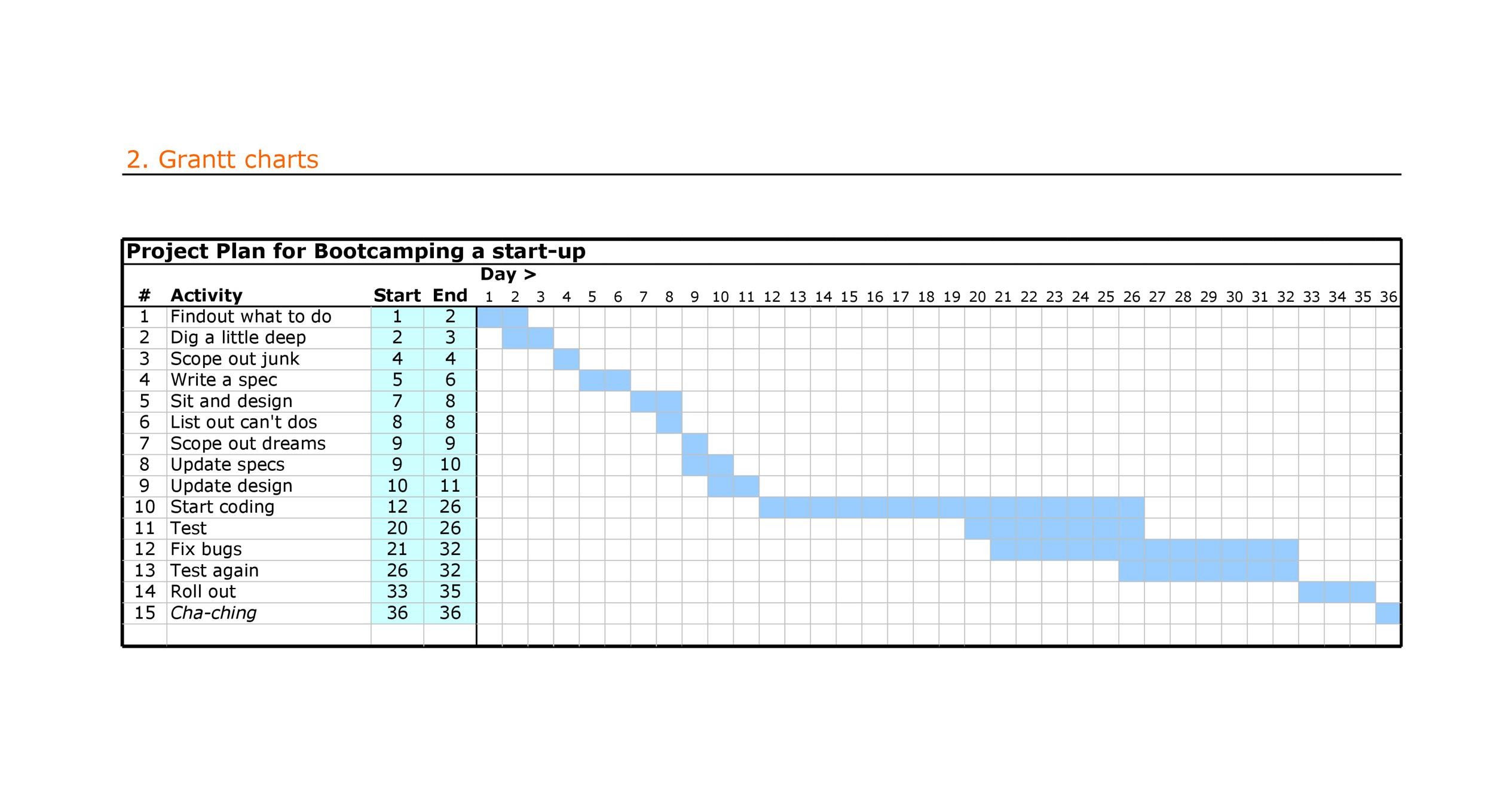 2500×1359 gantt chart templates excel powerpoint word template lab from templatelab.com
 Thank you for visiting Text-based Gantt Chart Format Template. There are a lot of beautiful templates out there, but it can be easy to feel like a lot of the best cost a ridiculous amount of money, require special design. And if at this time you are looking for information and ideas regarding the Text-based Gantt Chart Format Template then, you are in the perfect place. Get this Text-based Gantt Chart Format Template for free here. We hope this post Text-based Gantt Chart Format Template inspired you and help you what you are looking for.
Text-based Gantt Chart Format Template was posted in December 16, 2025 at 10:53 am. If you wanna have it as yours, please click the Pictures and you will go to click right mouse then Save Image As and Click Save and download the Text-based Gantt Chart Format Template Picture.. Don’t forget to share this picture with others via Facebook, Twitter, Pinterest or other social medias! we do hope you'll get inspired by SampleTemplates123... Thanks again! If you have any DMCA issues on this post, please contact us!